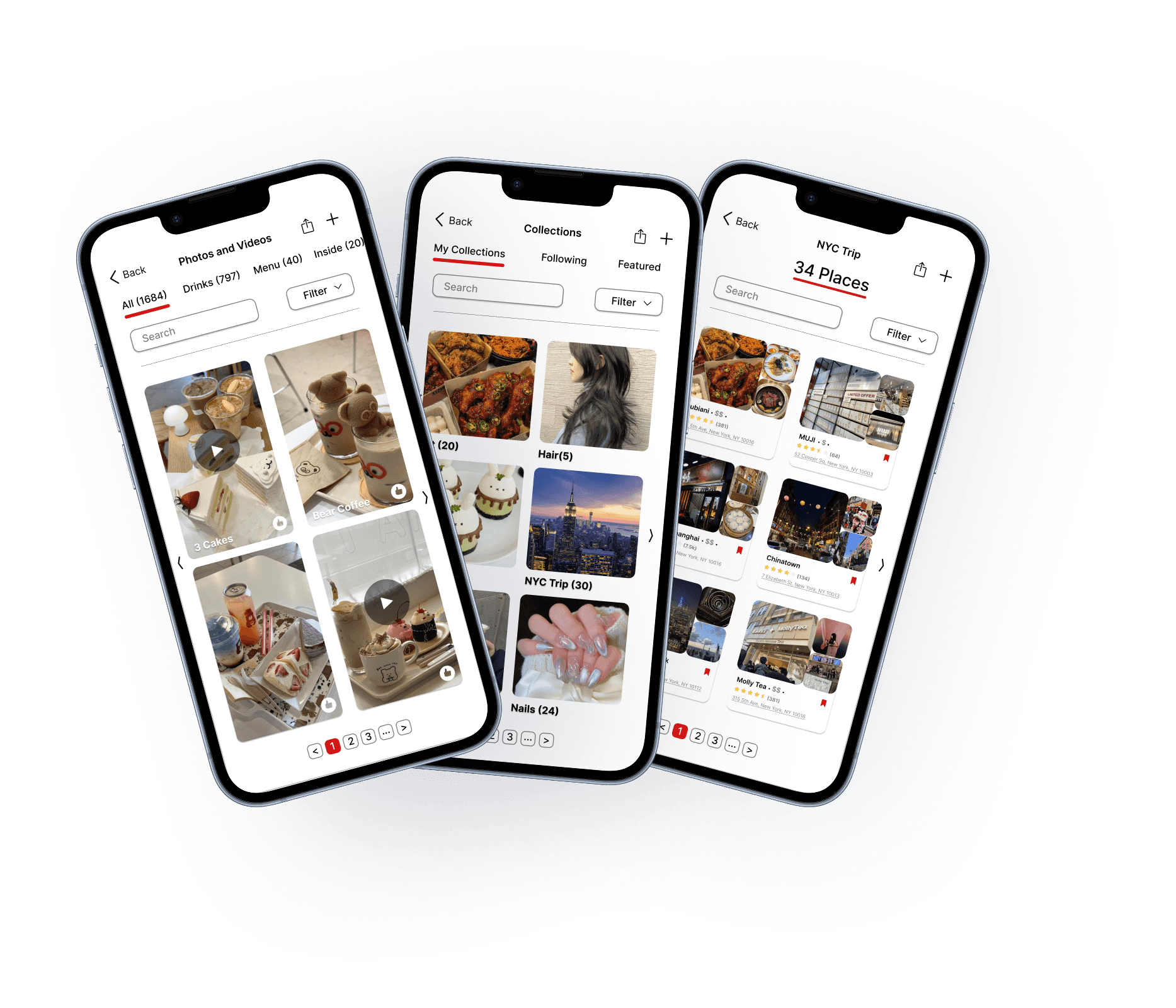
Yelp is a widely used platform for discovering local businesses, reading reviews and sharing experiences through photos and videos. During an unsolicited redesign project, I focused on improving Yelp’s media browsing, collections, and bookmarks features to enhance usability on the mobile app. As the sole designer, I conducted the research, ideation, prototyping and high‑fidelity design. The redesign aimed to create consistent navigation, improve content discovery through better filtering and search, protect user actions and optimize space usage with grid layouts.
YEAR
Spring 2025
TOOLS
Figma
ROLE
UI/UX Designer
CLIENT
N/A
The Problem
How might we redesign Yelp’s mobile web interface to help users navigate, filter and find the perfect restaurant more efficiently?
Pain Points
Although Yelp offers an extensive database of images and videos, users find the media browsing experience unintuitive and cluttered.
To understand key pain points, I reviewed user complaints in app store reviews and tried common user tasks myself. I also looked at how platforms like Google Reviews, Pinterest, and Xiaohongshu structure visual content and interactions, where I drew inspiration from their approaches to filtering, labeling, and visual hierarchy.
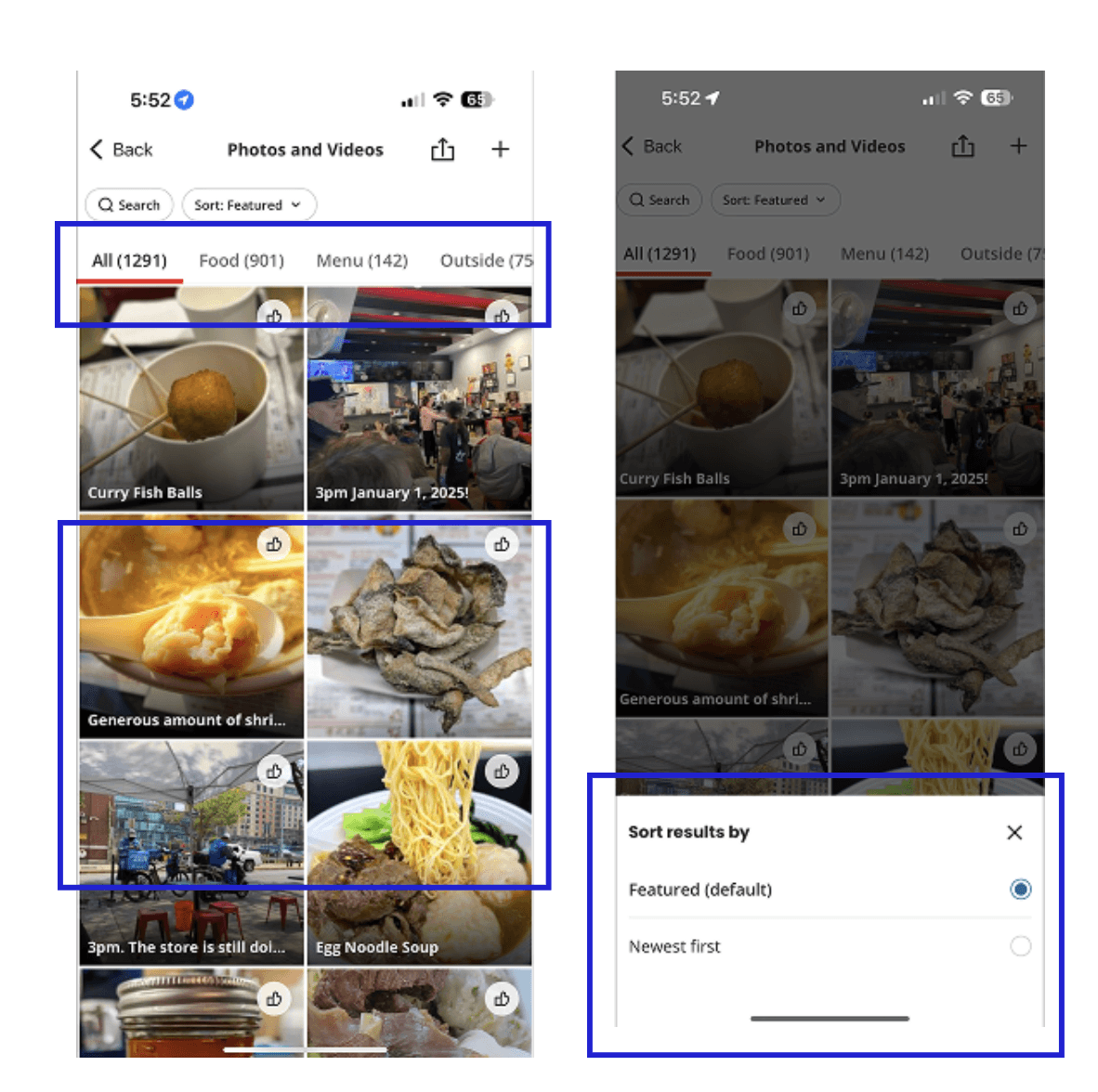
Collection and Bookmark Screens
Inconsistent navigation patterns
Vertical scrolling mixes with horizontal tabs, breaking flow.
Media cannot be distinguised
Thumbnails don’t show whether an item is a photo or video, forcing extra taps
Basic filtering options
No way to filter by format, recency, or popularity, so users scroll aimlessly.
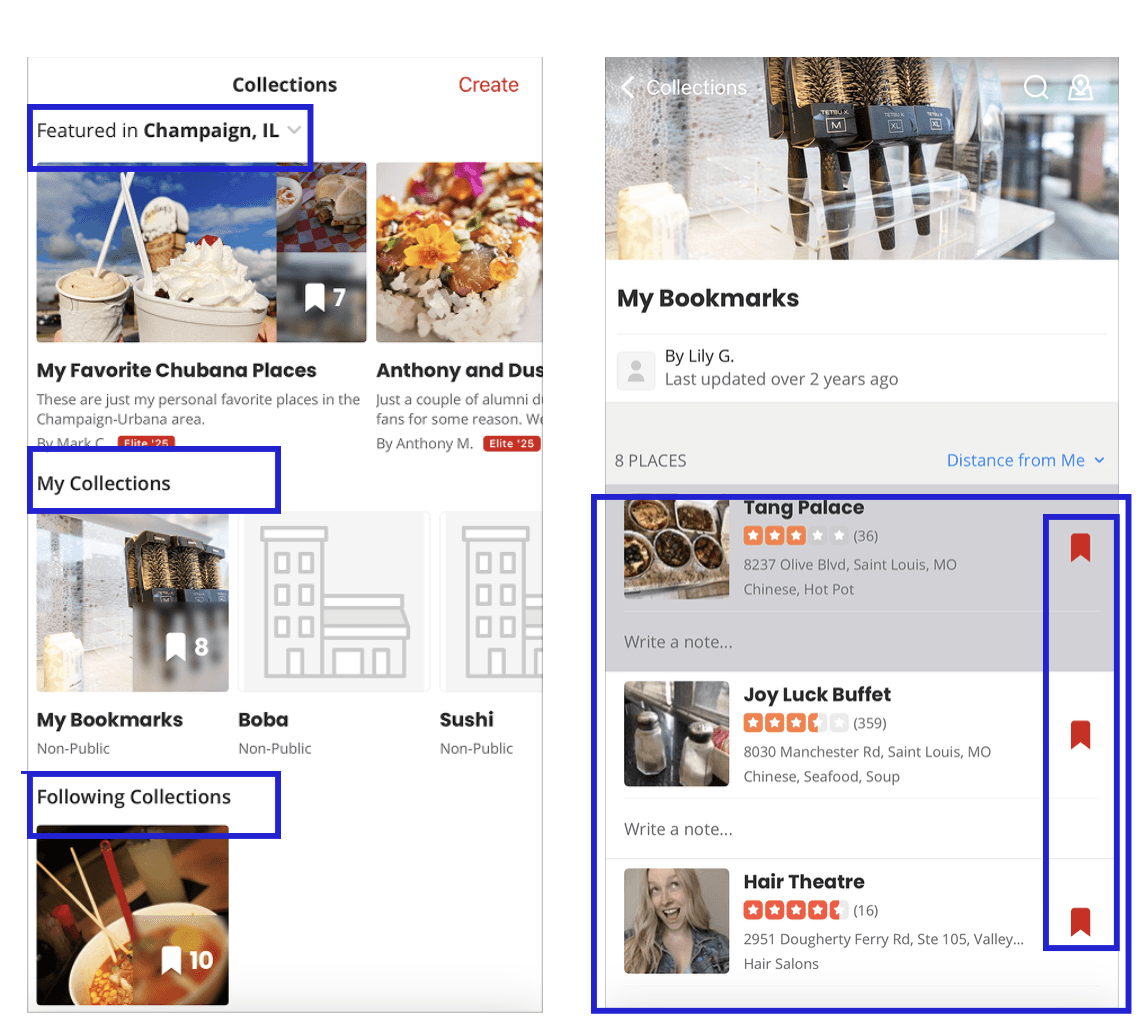
Photos and Videos Review Snapshot
Lack of Sorting Features
Collections can’t be ordered (newest, A-Z, etc.), so large lists quickly become cluttered.
List Based Layout
Bookmarks show as a long list, making quick scanning or side by side comparison impossible.
No Deletion Prompt
Favorites can be removed with one tap, so accidental deletions are common.
Goals
Differentiate media types so users could instantly recognise photos vs. videos without extra taps.
Enhance search and filtering with improved categories, price filters, sorting, and pagination to help users quickly find relevant content.
Organise collections and bookmarks using better layouts (grid vs. list), search and sorting tools and clear navigation.
Provide confirmation dialogs to prevent accidental deletions
Ensure consistency across screens like tab placement, scroll behaviour and filter interactions, as consistent navigation helps users build a mental map and reduces cognitive load
Ideation
I began with low‑fidelity sketches to explore layouts, filter interactions and navigation changes.
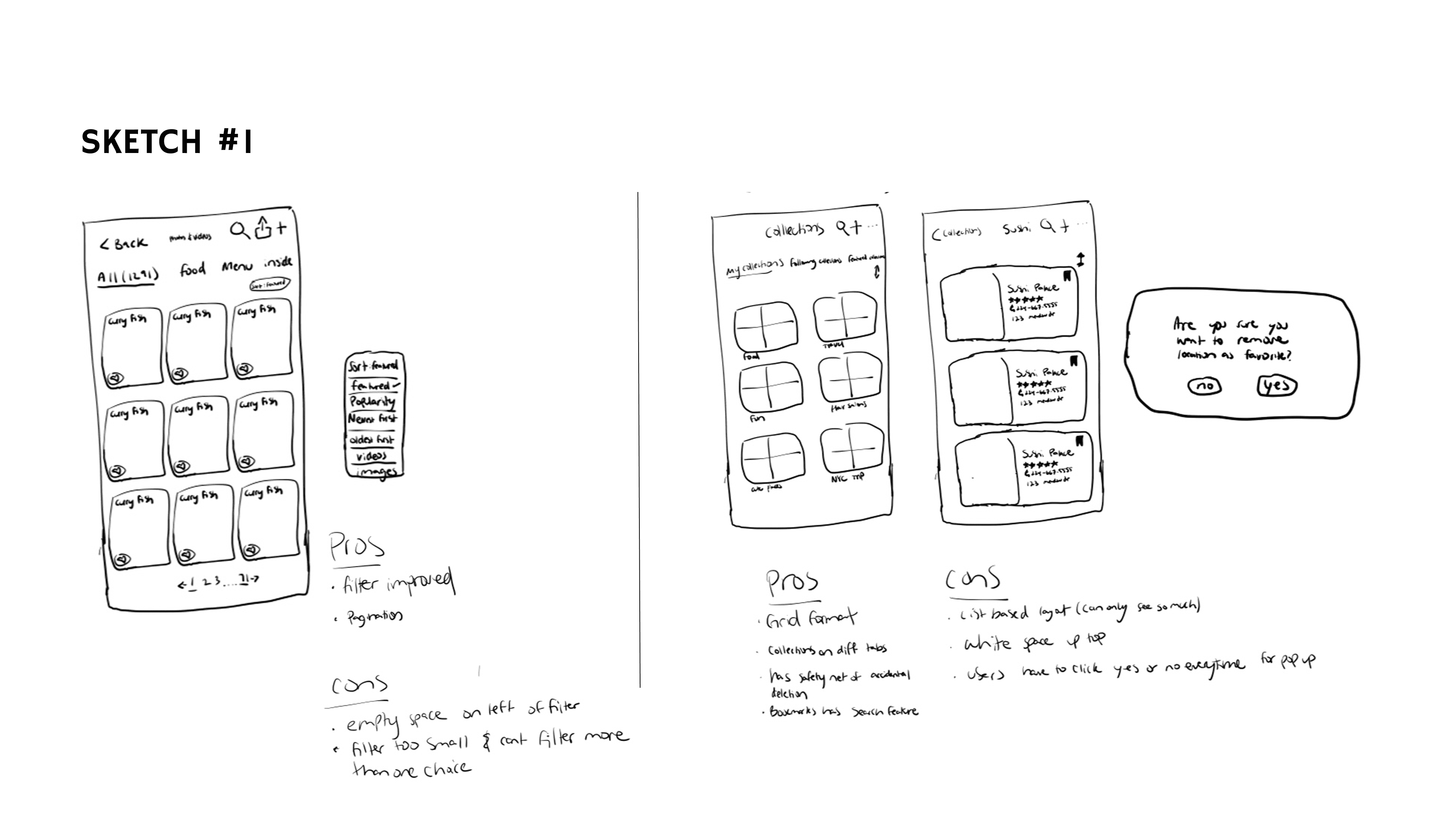
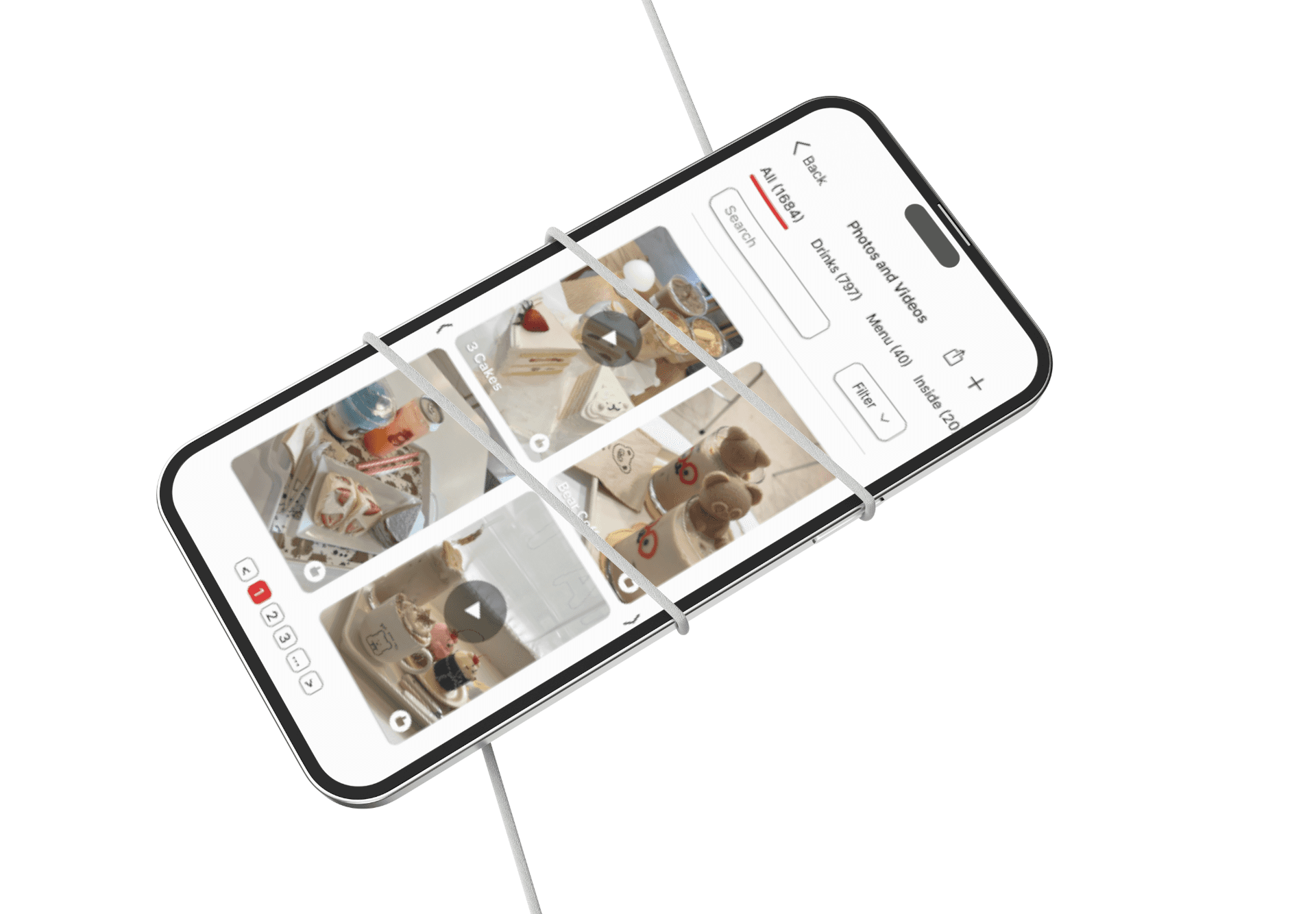
Sketch #1 shows an early idea for the media screen: a two‑column grid for photos/videos with filter and sort options.
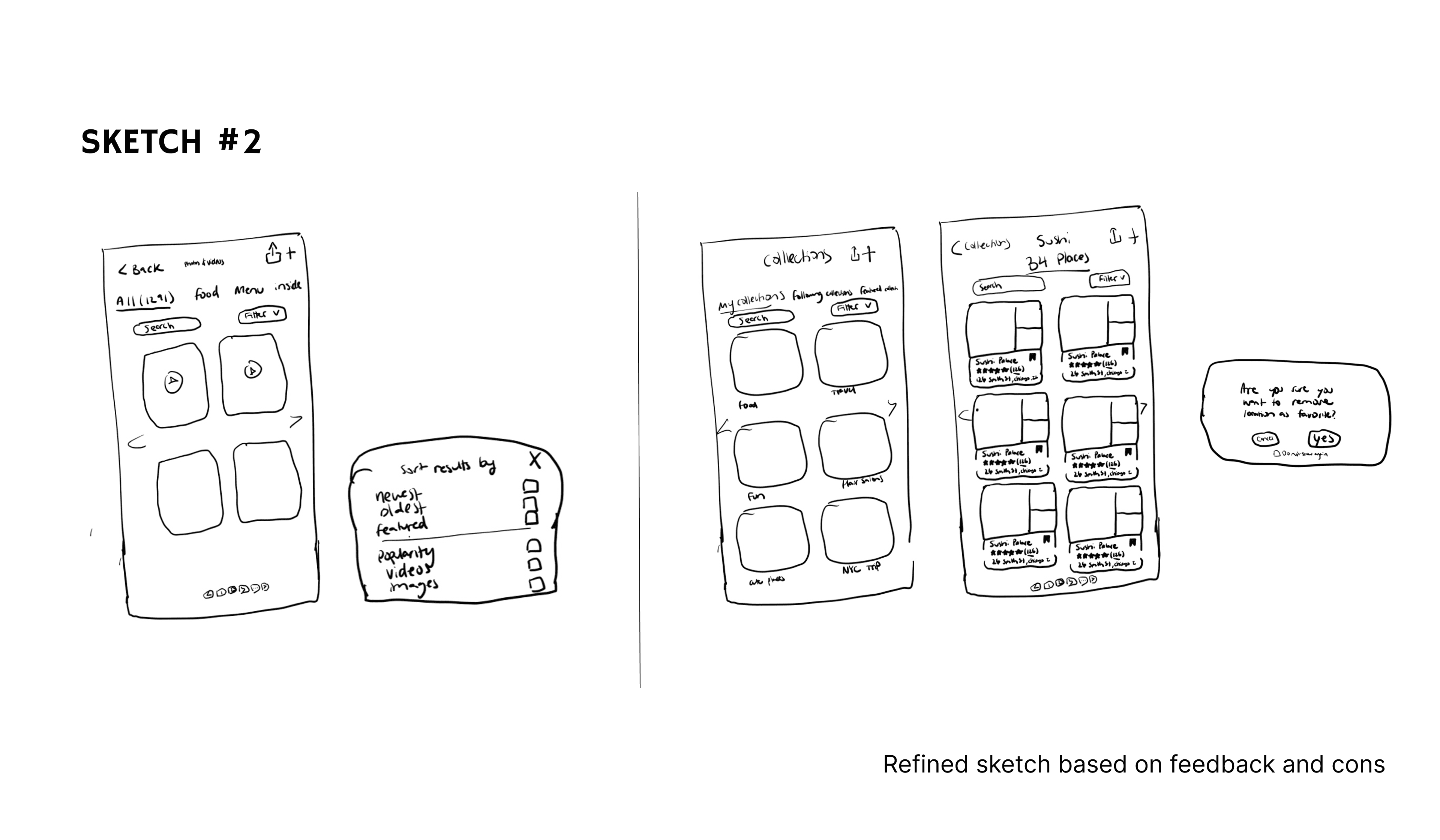
Sketch #2 refines the idea with a cleaner layout and overlay filter panel.
Design Improvements
Optimized Layouts
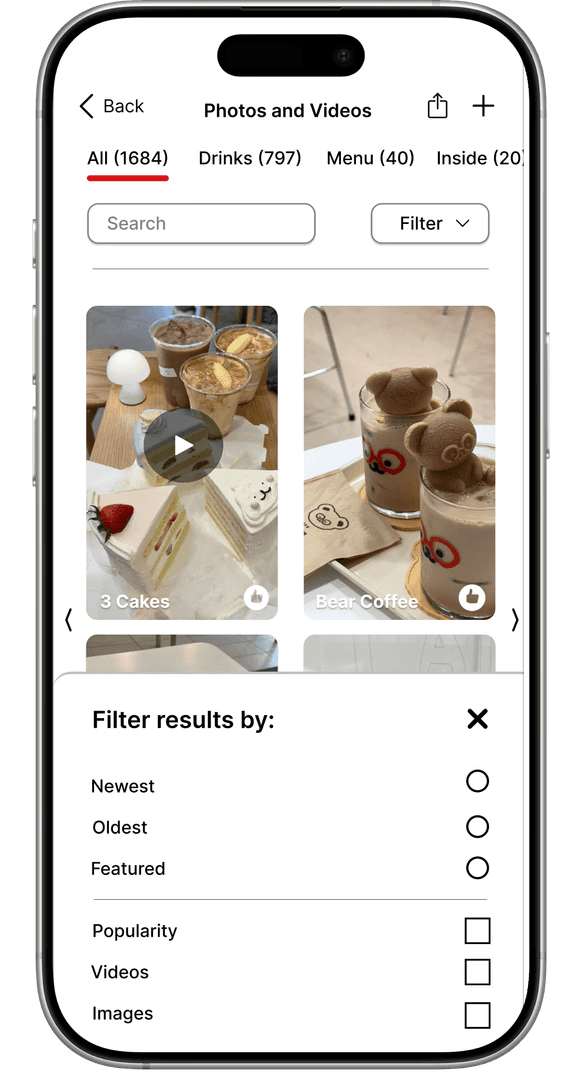
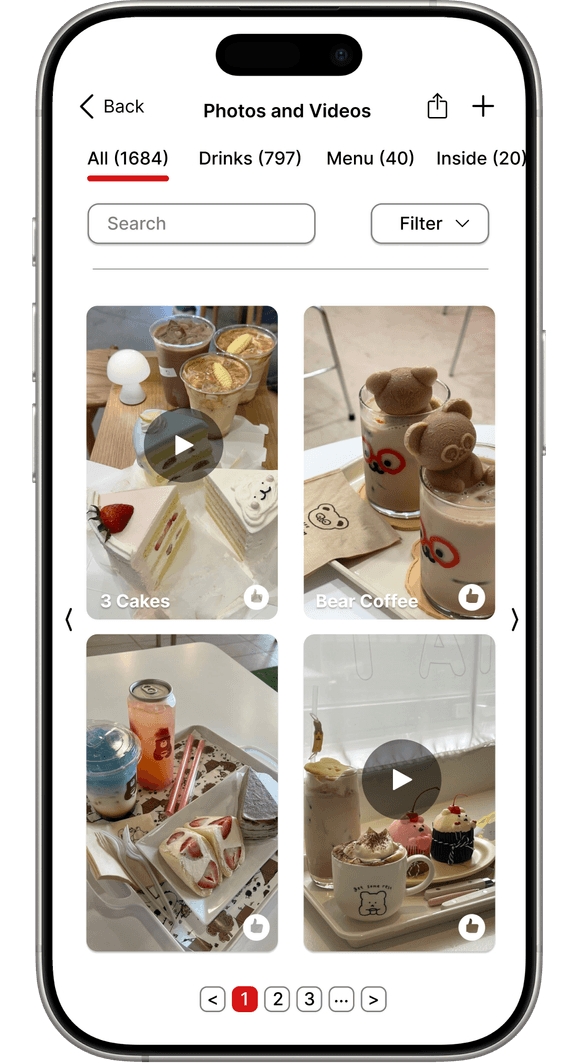
Grid layouts maximized space usage and allowed users to view more content simultaneously. Pagination replaced endless lists with manageable pages.
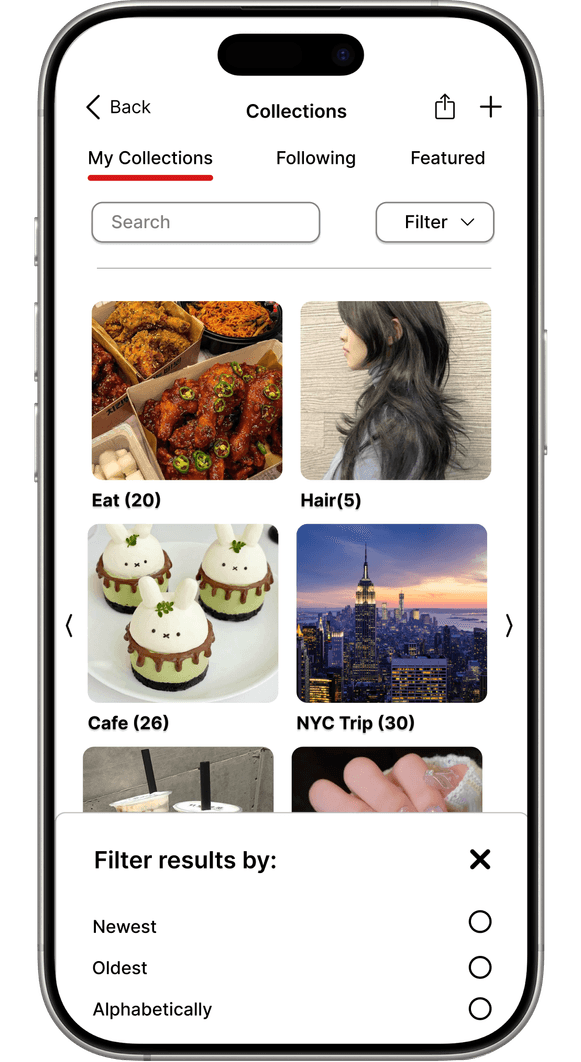
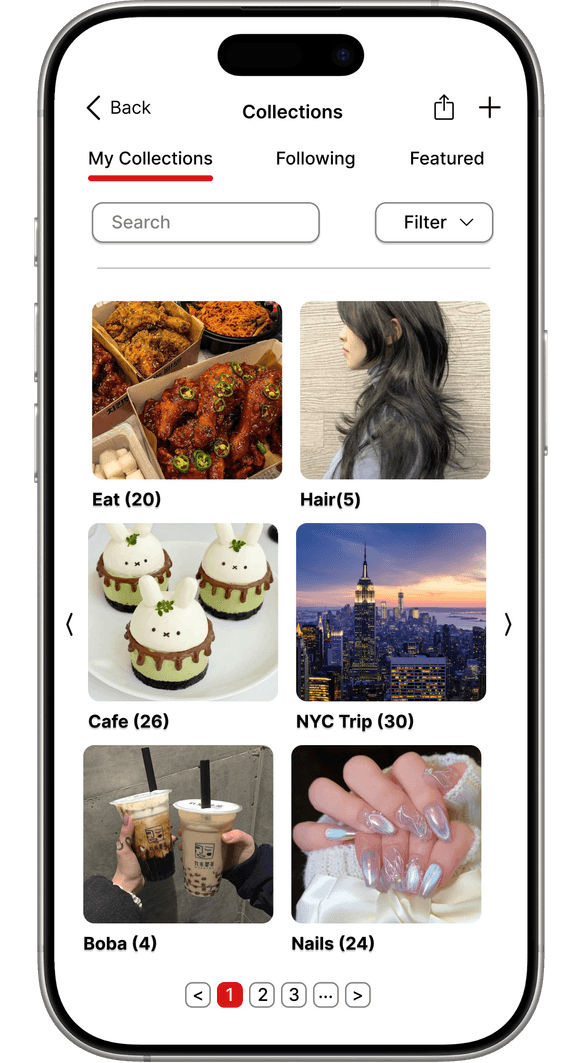
Enhanced Content Discovery
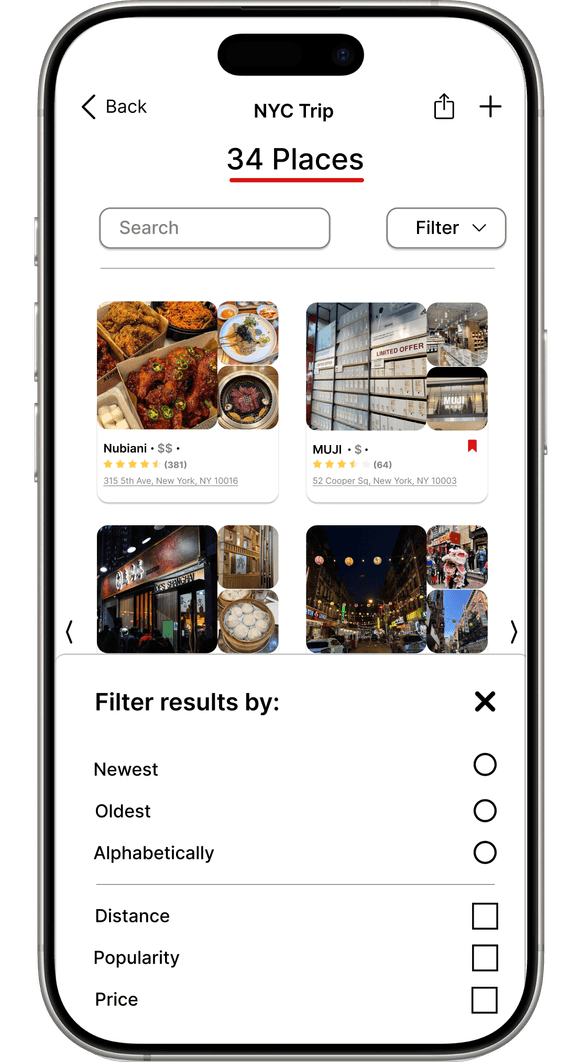
Large thumbnails, visible video labels, search bars and multi‑criteria filters (newest, oldest, featured, popularity, images/videos, alphabetical, price, popularity) enabled targeted browsing
Consistent navigation patterns
Horizontal scrolling for categories and pagination unified the browsing experience and reduced cognitive load.
User control
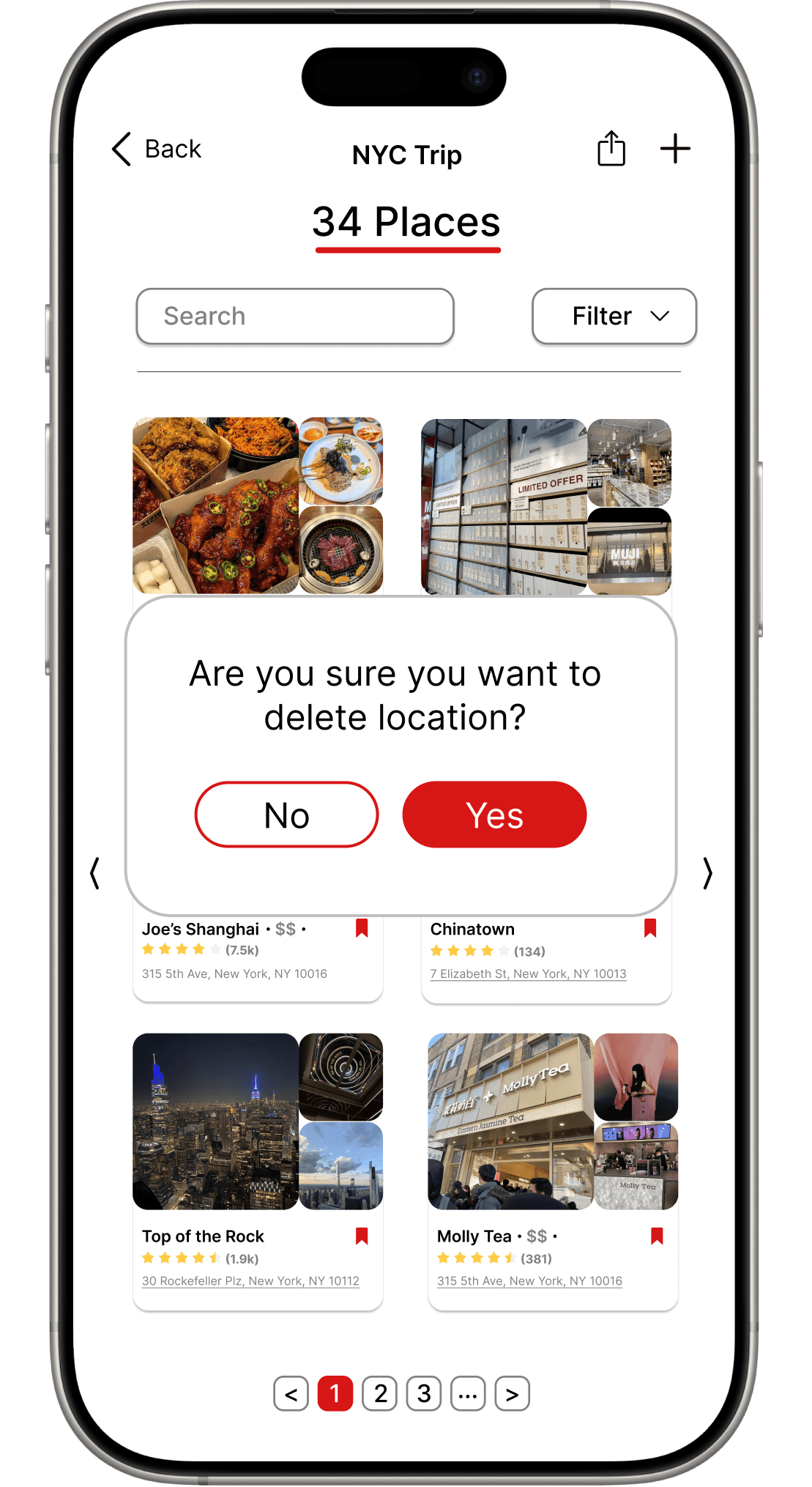
Confirmation prompts option protected users from unintended deletions while respecting their preferences.
View at a glance
Able to see at a quick glance, the necessary information to make quick comparisons with pricing and photo presentation.
Reflection
This redesign project taught me the significant impact that thoughtful navigation and well-implemented features have on user experience! By exploring pain points and iterating through my designs, I've grown an appreciation for the subtle details that make interfaces more user-friendly. If time allowed, I would explore micro‑interactions (e.g., subtle hover states, animations) and conduct quantitative metrics (task completion time) to validate improvements further.
Smooth Scroll
This will hide itself!
This will hide itself!
1. Inconsistent navigation patterns
Vertical scrolling mixes with horizontal tabs, breaking flow.
1. Inconsistent navigation patterns
Vertical scrolling mixes with horizontal tabs, breaking flow.
Yelp Redesign
OVERVIEW
Yelp is a widely used platform for discovering local businesses, reading reviews and sharing experiences through photos and videos. During an unsolicited redesign project, I focused on improving Yelp’s media browsing, collections, and bookmarks features to enhance usability on the mobile app. As the sole designer, I conducted the research, ideation, prototyping and high‑fidelity design. The redesign aimed to create consistent navigation, improve content discovery through better filtering and search, protect user actions and optimize space usage with grid layouts.
YEAR
Spring 2025
TOOLS
Figma
ROLE
UI/UX Designer
CLIENT
N/A
The Problem
How might we redesign Yelp’s mobile web interface to help users navigate, filter and find the perfect restaurant more efficiently?
Pain Points
Although Yelp offers an extensive database of images and videos, users find the media browsing experience unintuitive and cluttered.
To understand key pain points, I reviewed user complaints in app store reviews and tried common user tasks myself. I also looked at how platforms like Google Reviews, Pinterest, and Xiaohongshu structure visual content and interactions, where I drew inspiration from their approaches to filtering, labeling, and visual hierarchy.
Inconsistent navigation patterns
Vertical scrolling mixes with horizontal tabs, breaking flow.
Media cannot be distinguised
Thumbnails don’t show whether an item is a photo or video, forcing extra taps
Basic filtering options
No way to filter by format, recency, or popularity, so users scroll aimlessly.
Lack of Sorting Features
Collections can’t be ordered (newest, A-Z, etc.), so large lists quickly become cluttered.
List Based Layout
Bookmarks show as a long list, making quick scanning or side by side comparison impossible.
No Deletion Prompt
Favorites can be removed with one tap, so accidental deletions are common.
Photos and Videos Review Snapshot
Collection and Bookmark Screens
Goals
Differentiate media types so users could instantly recognise photos vs. videos without extra taps.
Enhance search and filtering with improved categories, price filters, sorting, and pagination to help users quickly find relevant content.
Organise collections and bookmarks using better layouts (grid vs. list), search and sorting tools and clear navigation.
Provide confirmation dialogs to prevent accidental deletions
Ensure consistency across screens like tab placement, scroll behaviour and filter interactions, as consistent navigation helps users build a mental map and reduces cognitive load
Ideation
I began with low‑fidelity sketches to explore layouts, filter interactions and navigation changes.
Sketch #1 shows an early idea for the media screen: a two‑column grid for photos/videos with filter and sort options.
Sketch #2 refines the idea with a cleaner layout and overlay filter panel.
Design Improvements
Enhanced Content Discovery
Large thumbnails, visible video labels, search bars and multi‑criteria filters (newest, oldest, featured, popularity, images/videos, alphabetical, price, popularity) enabled targeted browsing
Consistent navigation patterns
Horizontal scrolling for categories and pagination unified the browsing experience and reduced cognitive load.
Optimized Layouts
Grid layouts maximized space usage and allowed users to view more content simultaneously. Pagination replaced endless lists with manageable pages.
User control
Confirmation prompts option protected users from unintended deletions while respecting their preferences.
View at a glance
Able to see at a quick glance, the necessary information to make quick comparisons with pricing and photo presentation.
Reflection
This redesign project taught me the significant impact that thoughtful navigation and well-implemented features have on user experience! By exploring pain points and iterating through my designs, I've grown an appreciation for the subtle details that make interfaces more user-friendly. If time allowed, I would explore micro‑interactions (e.g., subtle hover states, animations) and conduct quantitative metrics (task completion time) to validate improvements further.